Add TOTP as MFA using an authenticator app
This guide describes how to add an authenticator app as an added security factor to your Sunet Drive user account.
-
Open your web browser and log on to Sunet Drive with your user account
-
Go to (User account symbol) → Settings → Security
-
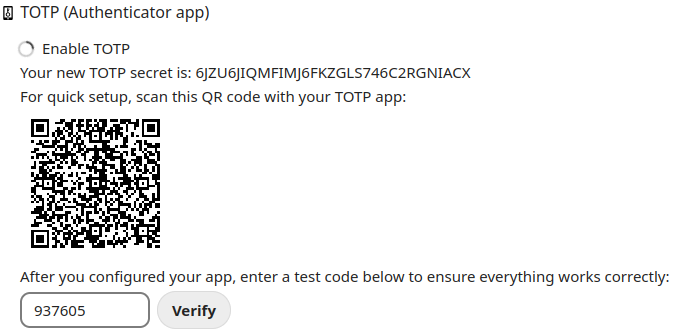
Check the box “Enable TOTP”
-
Scan the QR code with your authenticator app, or manually add the TOTP secret to the app
-
Confirm TOTP by entering the currently displayed code
Important Notes
- It is only possible to configure one TOTP for your account.
- If you want to use TOTP on multiple devices, you have to configure them manually using the QR code or TOTP secret
- If you uncheck “Enable TOTP”, you have to configure TOTP again with a new TOTP secret
Example screen to configure TOTP