Managing S3 buckets in Sunet Drive
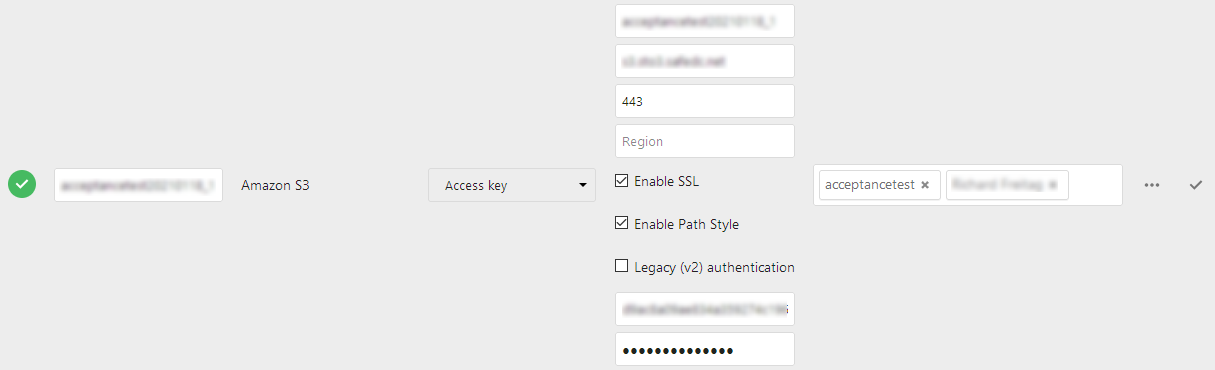
The main storage entity in Sunet Drive are S3-buckets that can be assigned to users or groups on a full Sunet Drive node. There are a number of buckets preconfigured and an administrator of a node can assign the bucket.
Attention: Every institution has their own process on how to apply for an S3-bucket in Sunet Drive. Please contact your local IT or data office to ask about the availability of a bucket.
To assign a bucket, rename the folder name on the left side in accordance to the naming guidelines of your institution, and select the users/groups on the right side.
Additional settings
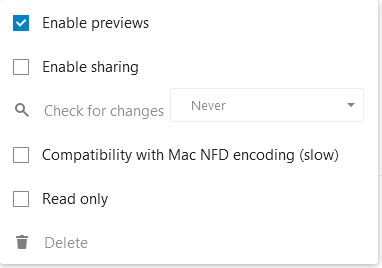
There are some additional settings that should be activated/deactivated in accordance with the local guidelines for storage handling. Notable are “enable sharing” which prevents users from inviting other members to the S3-bucket, and “read only”, which prevents any file changes on the bucket. If you click (and confirm) the deletion of a storage, the link from Nextcloud to the S3-bucket will be removed, but not the S3-bucket. If you want to delete a bucket and its content, you need to contact Sunet support.
Attention: One notable setting is “Check for changes”, which must always stay at “Never”. Setting it to anything else can result in undesired behavior on the sync-client side.