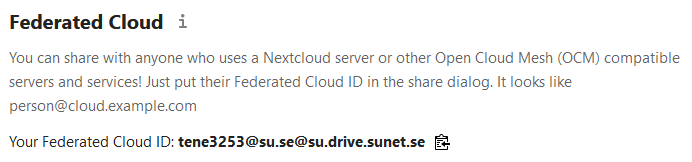
Federated Cloud ID
The Federated Cloud ID is your unique username which can be used to send and receive shares in Sunet Drive. It is a combination of your local user ID and the Sunet Drive node you are logged on to. The ID can be found under Settings → Sharing. While you can search for users in Sunet Drive using their name or their e-mail address, the Federated Cloud ID is used to uniquely identify a user to add them to shared files and folders.
Note: If you change to another university and log on to Sunet Drive with your new ID, you will get a new Federated Cloud ID and Sunet Drive treats that as a new user.
Here are three examples for Federated Cloud IDs:
- tene3253@su.se@su.drive.sunet.se - This is the Federated Cloud ID of a test user from Stockholm University
- freitag@sunet.se@sunet.drive.sunet.se - a Sunet staff account
- bamoh-nator@eduid.se@extern.drive.sunet.se - is the ID of an external collaborator that created a Sunet Drive account via eduid.se
If your collaborators use an Open Cloud Mesh compatible storage solution, you can also send and receive shares outside of Sunet Drive. Currently supported OCM platforms are Nextcloud, ownCloud, and Seafile.
Federated Cloud ID from Settings Dialogue